Overview
Merlin is a secure business assistant powered by advanced AI technology and agentic tools from Syntron Systems. It provides intelligent access to Google Workspace tools such as Google Drive, Gmail, as well as the ticket management system Trello, allowing you to search documents, retrieve contents, and manage tasks through natural conversation.
🤖 AI Chat Interface
Real-time streaming responses powered by advanced AI models.
🔐 Secure Login
Google authentication for secure access and easy permission control.
🔧 Integrated Tools
Access Google Drive, Gmail, and Trello seamlessly through chat.
How to Login
Merlin uses Google sign-in for secure, easy authentication. Follow these simple steps to get started:
- Visit the Application: Navigate to the Merlin homepage
- Click "Continue with Google": You'll see the login page with a blue Google sign-in button
- Sign in with Google: Enter your Google account credentials
- App Verification Notice: You'll see a screen that says "Google hasn't verified this app"
This warning appears because Merlin is currently in testing mode. Click "Continue" to proceed.
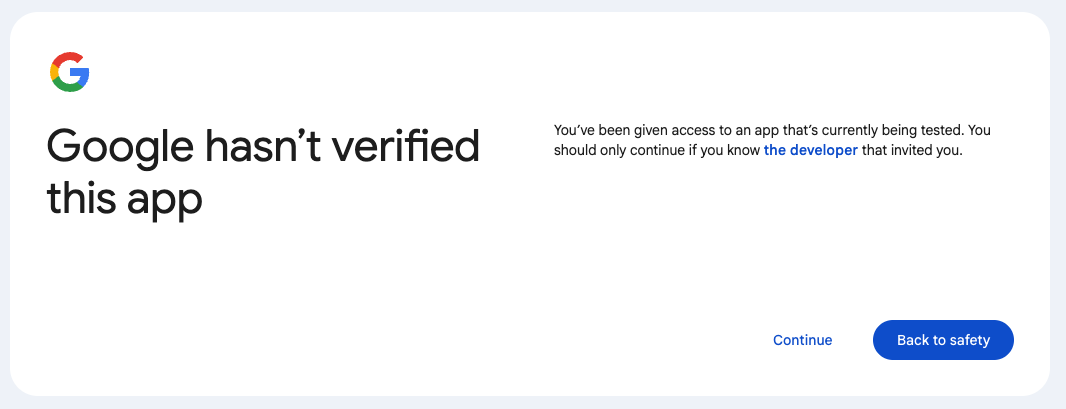
Step 5: Application permissions:
Merlin needs permission to access your Google Drive and Gmail. These credentials are retained only for the duration of your session and are never stored permanently. Click "Select All" and "Continue" to authorize access.
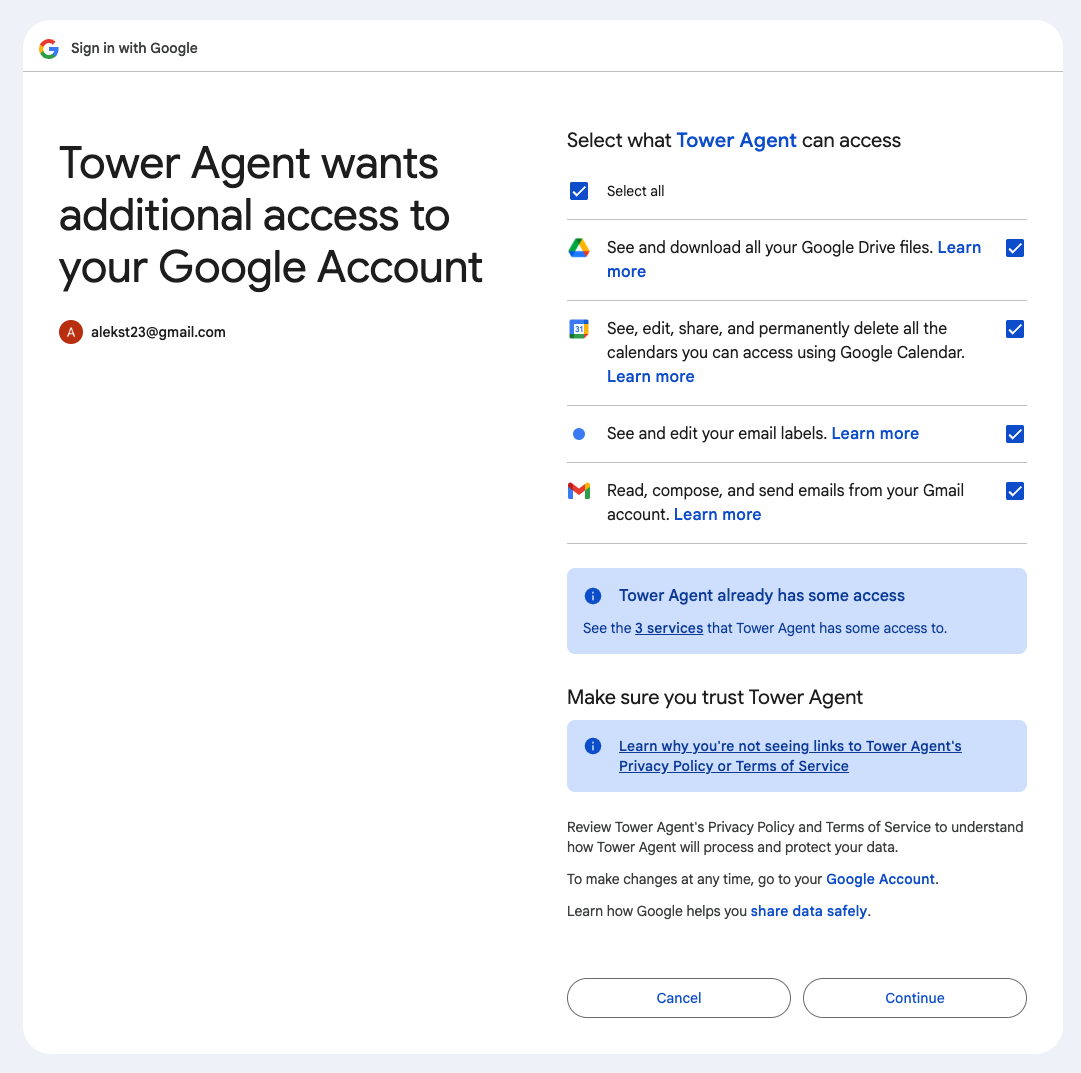
Step 6: Once authorized, you'll be redirected back to the chat interface and can start using Tower Agent!
Your login session is maintained using your browser cookies. The application automatically refreshes your access to maintain uninterrupted service.
Your Privacy & Data Access
What Data We Access
Tower Agent requests broad permissions from Google API for Email, Drive, and Calendar, but we only utilizate non-distructive, informational features in the tools:
- Google Profile Information: Your email address, name, and profile picture for authentication and session personalization
- Google Drive: Search and read google drive documents
- Gmail: Search and read email; list and apply labels to emails
- Trello: List boards, search and view cards, update cards, add and remove labels to cards
Tower Agent only accesses your data when you explicitly request it through the chat interface. The AI assistant operates on your behalf and only retrieves information in response to your direct queries.
How We Use Your Data
Your data is used exclusively to provide the requested services and is never stored:
- Real-time Processing: Data is processed in real-time to answer your queries and perform requested actions
- No Training: Your data is NEVER used to train AI models
- No Third-Party Sharing: Your data is not shared with any third parties beyond the AI service provider and integrated tools (Google, Trello)
- Session-based Access: Authentication tokens are used only for the duration of your authenticated session
Data Security
All data transmission is secured using industry-standard encryption:
- HTTPS/TLS: All communications between your browser and Tower Agent use HTTPS encryption
- Encrypted API Calls: Calls to Google APIs, Trello APIs, and AWS Bedrock are encrypted in transit
- Secure Cookies: Session tokens are cryptographically signed and stored in HttpOnly cookies to prevent attacks
Data Retention Policy
Tower Agent does not store your conversations or personal data. We prioritize your privacy by design.
What We DON'T Store
- No Conversation Storage: Your chat conversations are NOT stored on our servers
- No Personal Data Retention: Your Google Drive documents, emails, and Trello data are NEVER saved to our systems
- No Persistent Databases: We do not maintain databases of user conversations or accessed content
- No Long-term Logs: Your queries and responses are not logged or retained
Session Data (Temporary)
Tower Agent maintains minimal session data only while you're actively using the application:
- In-Memory Only: Session data (including authentication tokens) is stored temporarily in memory
- 24-Hour Expiry: Sessions automatically expire after 24 hours of inactivity
- Automatic Clearing: When the application restarts, all session data is automatically cleared
- Browser-Only History: Chat conversation history is stored only in your browser's memory for the current session
If the Tower Agent service restarts, all active sessions are cleared and you'll need to log in again. No personal data is lost because none is stored permanently.
Your Control Over Data
You have complete control over your data at all times:
- Immediate Logout: Logging out immediately destroys your session and removes all tokens from memory
- Revoke Access Anytime: You can revoke Tower Agent's access to your Google account at any time through your Google Account settings
- Browser Control: You can clear your browser history to remove any locally stored conversation data
- No Data Recovery: Once your session ends, there is no way to recover it because nothing is stored permanently
Privacy by Design
Tower Agent is built with privacy as a core principle:
- Minimal Data Collection: We only collect data absolutely necessary to authenticate you and provide the service
- No Analytics Tracking: No third-party analytics or tracking scripts are used
- Transparent Operations: All data access is initiated by your explicit requests through the chat interface
- No Marketing: Your data is never used for marketing, advertising, or any purpose other than serving your requests
Tower Agent acts as a secure proxy to access your Google and Trello accounts on your behalf, using your authenticated credentials. We retrieve data only when you ask, process it in real-time to answer your question, and never store it. When your session ends, everything is gone.
Security & Privacy
Security Measures
- OAuth 2.0 Standard: Industry-standard authentication protocol used by Google
- Signed Session Tokens: All session tokens are cryptographically signed to prevent tampering
- HttpOnly Cookies: Session cookies are HttpOnly and SameSite to prevent XSS and CSRF attacks
- HTTPS Required: All connections use HTTPS encryption
- Token Refresh: OAuth tokens are automatically refreshed to maintain security
- No Plaintext Secrets: API keys and secrets are never stored in code
Privacy Commitments
- Zero Permanent Storage: We do not store your conversations or accessed data
- No Analytics Tracking: No third-party analytics or tracking scripts
- Transparent Operations: All data access is initiated by you through the chat interface
- No Data Sharing: Your data is not shared with third parties (except AWS Bedrock for AI processing)
- No Training Data: Your conversations are never used to train AI models